Elevating Digital Art with Sky Swatches Procreate: A Guide to Atmospheric Color
The sky is often the most challenging element for digital artists to master. It is not merely a backdrop; it is a dynamic, living entity that dictates the mood, lighting, and emotional resonance of an entire composition. Whether you are illustrating a whimsical children’s book, designing a moody landscape, or creating concept art for a game, getting the atmosphere right is crucial. This is where specialized tools like Sky Swatches Procreate become indispensable. By curating specific palettes for Blue Sky, Sunset, and night scenes, these swatch sets remove the guesswork from color selection, allowing artists to focus on brushwork and composition.
The Power of Curated Color Palettes
Color theory is complex. While understanding complementary and analogous colors is fundamental, applying them in real-time during a creative flow can be disruptive. Many artists find themselves stuck in "color picker paralysis," endlessly adjusting hue and saturation sliders without achieving the desired effect. Pre-made swatch sets solve this problem by providing professionally balanced combinations that are ready to use.
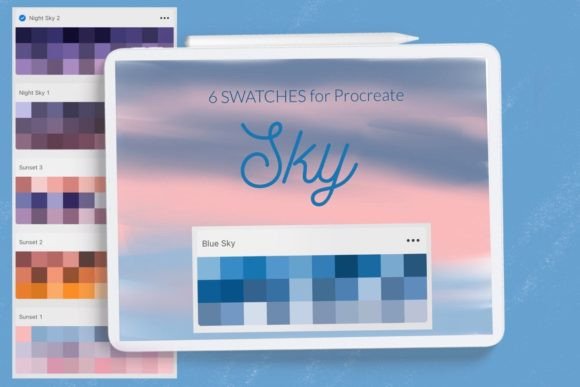
A high-quality set typically includes around six distinct swatches per theme. For instance, a Blue Sky palette might range from deep cerulean to pale azure, capturing the gradient of a clear midday heaven. A Sunset collection would offer warm oranges, vibrant magentas, and soft purples that blend seamlessly. Meanwhile, night sky colors provide the deep indigos and muted grays necessary for realistic nocturnal scenes. Having these options at your fingertips ensures consistency across your illustration and design projects.
Enhancing Workflow Efficiency on iPad
For professionals working exclusively on the iPad, efficiency is key. The tactile nature of drawing on glass requires minimal friction between thought and execution. When you install Sky Swatches Procreate files, you integrate them directly into the native interface. This means you do not need to switch apps or reference external images. Your new color palette appears at the bottom of the swatches library, instantly accessible with a single tap.
This integration is particularly beneficial for plein air digital painters or those who work in bursts of inspiration. Instead of mixing colors from scratch, you can select a base tone from the sunset swatches and modify it slightly using the opacity or blending modes. This hybrid approach—using a curated starting point and adding personal variation—speeds up the workflow while maintaining artistic integrity.
Understanding Compatibility and Installation
One of the most common hurdles for new users is the installation process. Procreate has evolved significantly over the years, and the method for importing assets depends largely on your software version and hardware. It is important to note that these swatches are designed Only for iPad Procreate. They will not function on desktop versions of Photoshop or other raster graphics editors without conversion.
If you are using a modern version of Procreate (5.0 and above), the process is generally streamlined through the share sheet. However, many artists still rely on older devices or have not updated their software due to compatibility with legacy brushes. If you have an older iPad or are running Procreate version 4.0 or earlier, you must use the .brush and .brushset import method. While this sounds technical, it is a straightforward procedure once understood.
Step-by-Step Installation for Older Versions
To ensure you can access your new Blue Sky, Sunset and Sky swatches for Procreate, follow these detailed steps if you are on an older system. This method relies on the iOS file system and the "Open In" functionality.
- Download the File: First, ensure the folder containing the
.brushfile is saved to your Files app on your iPad. This is usually in the "Downloads" folder unless you specified a different location. - Locate the Asset: Open the Files app and navigate to the folder where you saved the download. You should see the specific
.brushor.brushsetfile. - Initiate Sharing: Tap and hold the file with your finger or Apple Pencil. A context menu will appear. Select Share from the list of options.
- Select Procreate: Look for the option "Open in Procreate." If you do not see it immediately, click on More to expand the list of available apps.
- Enable the App: Scroll through the extended list until you find Procreate. Click on it to select it as the destination.
- Verify Import: Once clicked, Procreate should launch automatically. Your new asset will be imported into the current brush or swatch library.
Alternatively, there is a second method that works well for organizing assets before they enter the canvas. You can open Procreate first, create a new collection, and use the import function within the app. Click the brush icon at the top right corner, select "Import," and navigate to the folder with your downloaded brush or swatch file. Choose it, and it will be added directly to your Procreate library. This method gives you more control over where the asset lands, preventing clutter in your default folders.
Practical Applications in Illustration and Design
Why specifically choose sky-themed swatches? The answer lies in the versatility of atmospheric perspective. In landscape painting, the sky determines the light source. A Sunset palette implies low-angle, warm light that casts long shadows and saturates foreground objects. A Blue Sky palette suggests harsh, direct overhead light with cooler shadows. By using dedicated swatches, you ensure that your environmental lighting remains consistent throughout the piece.
Consider a scenario where you are designing a poster for a travel agency. You need to evoke a sense of calm and wonder. Using a pre-selected night sky palette allows you to quickly block in the background with deep, rich tones that convey tranquility. You can then layer stars or city lights using lighter values from the same swatch family, ensuring harmonic cohesion. This is far more effective than picking random blues and yellows, which might clash or look unnatural.
Furthermore, these swatches are not limited to landscapes. Character designers often use sky colors for ambient occlusion and rim lighting. If a character is standing outside during golden hour, using the sunset swatches for their shadow colors will ground them in the environment realistically. This subtle application of environmental color is what separates amateur illustrations from professional-grade design.
Maintaining Organization in Your Library
As you accumulate more assets, organization becomes critical. After installing your Sky Swatches Procreate set, take a moment to rename the collection. Instead of leaving it as "Imported Set," label it clearly, such as "Atmospheric Skies" or "Sunset Gradients." This makes it easier to locate when you are working on a tight deadline.
You can also drag and drop individual swatches into your default palette if there are specific shades you find yourself using repeatedly. For example, if one particular shade of twilight purple from the night sky set is perfect for your style, move it to your primary swatch bar. This customization allows the tool to adapt to your unique artistic voice rather than forcing you to adapt to the tool.
Final Thoughts on Digital Color Management
The transition to digital art offers infinite possibilities, but it also presents the paradox of choice. Tools like Sky Swatches Procreate act as a filter, narrowing down the infinite spectrum to the most useful and aesthetically pleasing options. Whether you are capturing the serene clarity of a Blue Sky or the dramatic intensity of a Sunset, having the right colors ready to go transforms the creative process.
Remember that these swatches are a starting point. The true magic happens when you blend them, adjust their opacity, and combine them with textured brushes. By mastering the installation and integration of these assets, you free up mental energy to focus on what truly matters: storytelling through art. So, open your iPad, import your new palette, and let the sky be the limit of your creativity. © Let s Art ♡.