Mastering the Halloween Procreate Stamps Bundle for Professional Digital Art
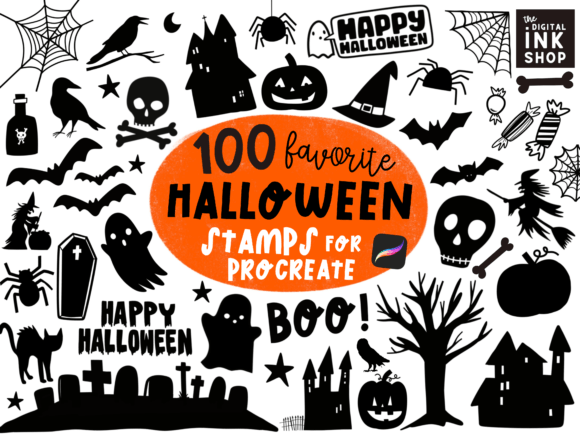
Digital illustration has evolved rapidly, and tools that streamline workflow are no longer just luxuries—they are necessities for efficient creators. The Halloween Procreate Stamps Bundle represents a significant leap forward for artists looking to produce high-quality seasonal content without starting from scratch. This collection features 100 hand-drawn spooky elements, including pumpkins, skeletons, graveyards, bats, black cats, ghosts, and haunted houses. However, simply downloading assets is not enough. Many users fail to maximize the potential of these resources because they overlook critical technical details regarding file formats, layer management, and artistic integration.
Understanding how to properly utilize this bundle can mean the difference between a generic, cluttered design and a polished, professional piece of art. Whether you are creating abstract prints, greeting cards, GIFs, digital wallpapers, stickers, or gift wraps, the way you approach these stamps determines the final quality of your work.
The Misconception of "Plug-and-Play" Simplicity
A common mistake among beginners and even some experienced freelancers is treating stamp bundles as finished products rather than raw materials. When you acquire a set that includes both line art and silhouettes, the temptation is to drop them onto the canvas at full opacity and call it done. This approach often results in flat, unengaging visuals that lack depth. The Halloween Procreate Stamps Bundle is designed to be manipulated. You must change the size, color, and opacity of these brushes to integrate them seamlessly into your composition.
For instance, using a black cat silhouette at 100% opacity against a dark background will make it disappear. Conversely, using it without adjusting the blending mode can make it look like a sticker slapped on top of a painting rather than part of the scene. A better approach is to lower the opacity to 60–80% and experiment with blending modes like Multiply or Overlay. This allows the texture of the underlying layers to show through, creating a cohesive and atmospheric effect suitable for haunted house illustrations or eerie digital wallpapers.
Overlooking File Format Versatility
One of the most overlooked features of this listing is the inclusion of SVG and PNG formats alongside the native Procreate brushes. Many users focus exclusively on the .brushset files, ignoring the versatility offered by vector and raster exports. This is a critical error for entrepreneurs and small business owners who may need to scale designs for different mediums.
Procreate brushes are excellent for direct illustration within the app, but they are resolution-dependent. If you plan to use these designs for large-format printing, such as banners or wall murals, relying solely on brush stamps can lead to pixelation. The SVG files included in the bundle allow for infinite scalability without loss of quality. By importing SVGs into vector-based software or using high-resolution PNGs for web graphics, you ensure that your greeting cards and gift wraps remain crisp regardless of the output size. Ignoring these formats limits your ability to repurpose content across multiple platforms, ultimately reducing the return on your investment.
Neglecting Composition and Hierarchy
With 100 distinct elements ranging from abstract Procreate designs to detailed graveyard scenes, there is a risk of visual overload. A frequent error is overcrowding the canvas. Beginners often feel compelled to use as many stamps as possible to justify the purchase. This leads to chaotic compositions where the viewer’s eye has nowhere to rest. Effective design relies on negative space and hierarchy.
To avoid this, select only two or three focal elements from the bundle—perhaps a large haunted house and a few bats—and build your composition around them. Use the smaller shapes and patterns as subtle background textures rather than primary subjects. For example, when creating flat illustrations for social media, use the abstract Procreate designs as a faint backdrop while keeping the main subject, like a ghost or pumpkin, clear and prominent. This balanced approach ensures that your communication remains clear and visually appealing.
Ignoring Color Theory and Customization
Another pitfall is sticking to the default black or white colors of the line art and silhouettes. While classic Halloween palettes involve orange, black, and purple, modern digital art often benefits from unexpected color combinations. Failing to experiment with hue, saturation, and brightness can make your work look dated.
Take advantage of Procreate’s adjustment tools to recolor these stamps. A skeleton rendered in soft pastel blues can create a whimsical, friendly vibe suitable for children’s book illustrations, while the same skeleton in deep crimson and shadow can evoke horror for a thriller novel cover. The ability to modify these elements means you are not locked into a single aesthetic. Always test different color schemes before finalizing your project to ensure the mood aligns with your intended audience.
Best Practices for Evaluation and Usage
Before integrating any asset into a client project or personal portfolio, it is essential to evaluate its suitability. Check the resolution of the PNG files and the smoothness of the SVG paths. Ensure that the line art is clean and free from unintended artifacts. When using the Procreate Texture Stamps, test them on different background colors to see how they interact. Some textures may vanish on busy backgrounds, requiring you to add a solid color layer beneath them for contrast.
Additionally, consider the licensing and usage rights if you are a marketer or freelancer. While this bundle is great for making various digital products, always verify if there are restrictions on mass production or resale of the raw assets. Using these stamps to create unique end products like stickers or wallpapers is generally acceptable, but reselling the brush files themselves is typically prohibited.
Enhancing Workflow Efficiency
Finally, organize your assets effectively. Importing 100 stamps can clutter your brush library. Create custom sets within Procreate for specific projects—for example, a "Spooky Backgrounds" set and a "Character Elements" set. This organization saves time and reduces frustration during the creative process. For educators and hobbyists, this practice also makes it easier to teach others how to use digital tools efficiently.
In conclusion, the Halloween Procreate Stamps Bundle offers a robust toolkit for creators, but its value is realized only through thoughtful application. By avoiding common mistakes such as ignoring file formats, overcrowding compositions, and neglecting customization, you can elevate your digital art. Remember to adjust opacity, experiment with colors, and utilize both vector and raster formats to ensure versatility. With these practical adjustments, you will produce high-quality, professional results that stand out in a crowded digital marketplace.