Brush Strokes Clipart: A Practical Guide to Enhancing Digital Design Projects
In the evolving landscape of digital design, the demand for authentic, hand-crafted elements has never been higher. Designers, educators, and content creators frequently seek assets that bridge the gap between polished digital precision and organic human touch. This is where Brush Strokes Clipart becomes an essential resource. Unlike standard geometric shapes or rigid vector icons, brush strokes introduce movement, texture, and artistic flair to any composition. Understanding how to effectively integrate these assets can significantly elevate the visual appeal of your work, whether you are designing social media graphics, educational materials, or branding elements.
Understanding the Value of High-Resolution Brush Assets
When evaluating digital art resources, technical specifications are just as critical as aesthetic appeal. A common pitfall for beginners is downloading low-resolution images that appear pixelated when scaled or printed. The specific collection discussed here addresses this concern by providing files in PNG format with a transparent background. This format is industry-standard for overlaying graphics onto various backgrounds without unsightly white boxes or jagged edges.
The inclusion of 15 HD PNG files, each sized at 3600 x 3600 pixels with a resolution of 300 DPI, ensures versatility. For context, 72 DPI is typically sufficient for screen-only viewing, but 300 DPI is the gold standard for professional printing. This means the same asset used for an Instagram post can also be utilized in a high-quality brochure or poster without loss of clarity. The transparency feature allows for seamless layering, enabling designers to place these bright brushes over photographs, solid colors, or textured backgrounds effortlessly.
Comparing Brush Strokes to Other Design Elements
To determine if this resource is the right fit for your project, it is helpful to compare brush strokes against other common design alternatives.
- Vector Shapes: Vectors are infinitely scalable and ideal for logos requiring strict geometric precision. However, they often lack the organic imperfection that makes a design feel "human." Brush strokes offer a handmade quality that vectors struggle to replicate without complex filtering.
- Stock Photography: While photos provide realism, they can be heavy in file size and difficult to manipulate. A transparent PNG brush stroke is lightweight, easy to rotate, and can be colored or blended using simple software tools, offering greater flexibility than a static photograph.
- Solid Color Blocks: Using solid colors for emphasis is functional but can feel sterile. Adding a brush stroke behind text or around a focal point adds depth and draws the eye more effectively than a simple rectangle or circle.
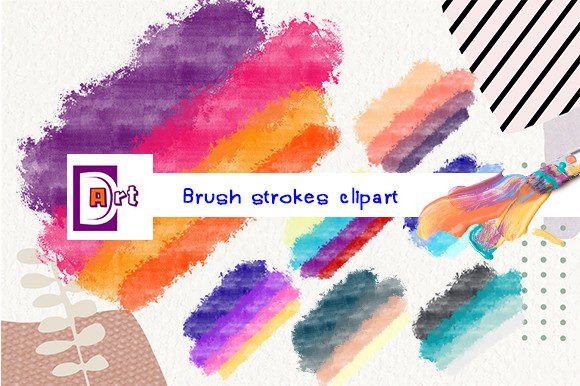
The distinct advantage of this particular set lies in its brightness and clarity. Many free brush assets suffer from muddy colors or poor edge definition. High-quality clipart maintains crisp edges even at large sizes, ensuring that the artistic intent remains clear regardless of the application.
Ideal Use Cases for Bright Brush Graphics
Identifying the right context for using Brush Strokes Clipart can maximize its impact. These assets are not merely decorative; they serve functional roles in visual hierarchy and user engagement.
Educational and Instructional Materials
Teachers and instructional designers often need to highlight key information without overwhelming students. Placing a bright brush stroke behind important terms or questions creates a visual anchor. The organic shape feels less formal than a highlighter tool, making the material appear more approachable and engaging for learners of all ages.
Social Media and Content Marketing
In crowded social feeds, stopping the scroll requires immediate visual interest. Brush strokes can frame product photos, underline catchy headlines, or add dynamic energy to quote graphics. Because the files are instant downloads and ready to use, they fit perfectly into the fast-paced workflow of social media management. The transparent background ensures they look professional on any brand-colored template.
Digital Scrapbooking and Personal Projects
For hobbyists involved in digital planning or scrapbooking, these elements add a personalized touch. The ability to unzip the files and immediately start dragging and dropping them into design software streamlines the creative process. The high resolution ensures that even if users zoom in on their digital planners, the edges remain smooth and professional.
Technical Considerations and Workflow Integration
While the benefits are clear, understanding the technical workflow is essential for a smooth experience. The product comes as a ZIP file, which is a compressed archive containing all 15 PNG images. Users must unzip this file before usage. This is a standard procedure for digital downloads but can be a stumbling block for those unfamiliar with file management.
On Windows, this typically involves right-clicking the file and selecting "Extract All." On macOS, double-clicking the ZIP file usually extracts the contents automatically. Once extracted, the individual PNG files can be imported into a wide range of software, including Adobe Photoshop, Canva, Procreate, Microsoft PowerPoint, and Keynote. The universal compatibility of the PNG format means you are not locked into expensive proprietary software to utilize these assets.
It is important to note that while these are high-resolution raster images, they are not vectors. This means that while 3600 x 3600 pixels is very large, scaling them beyond this size may result in some loss of quality. For most standard design needs, however, this dimension is more than sufficient.
Evaluating Alternatives: When to Look Elsewhere
No single resource fits every scenario. While this set of bright brushes is excellent for many applications, there are situations where you might need a different type of asset.
If your project requires infinite scalability without any pixelation, such as a large-format billboard viewed from a distance or a logo that needs to be embroidered on fabric, you may need to consider vector-based brush sets (SVG or AI formats). Additionally, if you require highly specific, realistic watercolor textures with complex blending modes, you might need specialized photographic textures rather than clean clipart.
Furthermore, if you need hundreds of variations for a massive automated design system, a set of 15 images may feel limited. In such cases, subscribing to a larger stock library might be more cost-effective. However, for targeted projects, small business branding, or specific campaign materials, a curated set of 15 high-quality images often provides better cohesion and ease of selection than sifting through thousands of mediocre options.
Making an Informed Decision
Choosing the right design assets involves balancing quality, convenience, and cost. This collection offers a strong balance by providing high-resolution, transparent files that are ready for immediate use. The instant download feature eliminates shipping wait times, allowing for rapid project turnaround. The inclusion of support via direct contact also adds a layer of reliability, ensuring that any technical issues with the download can be resolved quickly.
Before purchasing or downloading, consider your current software capabilities. Ensure your design tool supports PNG transparency. Most modern applications do, but verifying this prevents frustration later. Also, assess your color palette. Since these brushes are described as "bright," they will pop best against neutral or contrasting backgrounds. If your brand relies on muted, pastel tones, ensure the brightness of these strokes complements rather than clashes with your existing aesthetic.
Ultimately, Brush Strokes Clipart serves as a versatile tool in the designer’s toolkit. It offers a quick way to add personality and professionalism to digital projects without the time investment of creating custom artwork from scratch. By understanding the technical specs and ideal use cases, you can leverage these assets to create more engaging, visually appealing designs efficiently.
For those ready to enhance their creative projects, having access to reliable, high-quality elements like these can streamline the design process. Always remember to check the licensing terms for commercial versus personal use, and keep the original ZIP file archived for future access. With the right assets, even simple designs can achieve a polished, professional look that resonates with your audience.