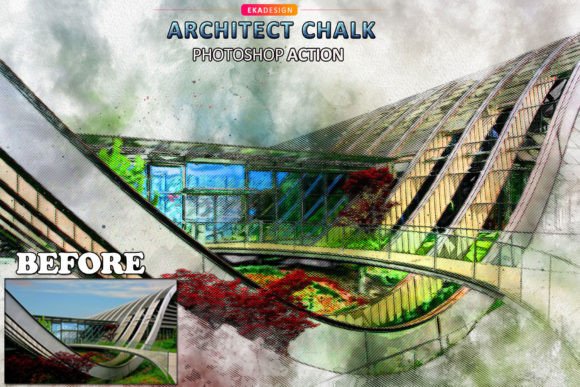
Architect Chalk Photoshop Action Guide
There is a distinct, tactile beauty in architectural sketches. The rough texture of chalk against paper, the deliberate yet organic lines, and the monochromatic depth create an aesthetic that feels both technical and deeply human. For designers, architects, and digital artists, replicating this look manually in post-production can be a tedious process involving multiple brush layers, mask adjustments, and texture overlays. This is where the Architect Chalk Photoshop Action transforms your workflow. It allows you to convert standard photographs into stunning, hand-drawn style visuals with just a couple of clicks, saving you an immense amount of work per photo while maintaining professional quality.
Why Choose Automated Chalk Effects?
In the fast-paced world of digital content creation, efficiency does not have to come at the cost of creativity. The primary value of this action lies in its ability to handle the heavy lifting of texture application and line detection. Instead of spending hours painting over edges or searching for the perfect grain overlay, you can focus on composition and storytelling. This tool is particularly useful for professionals who need to produce consistent visual styles across multiple projects, such as real estate marketers, interior designers, or social media managers looking to elevate their brand aesthetic.
The action is designed to be intuitive yet powerful. It works by analyzing the contrast and edges in your image, applying specific brushes and patterns that mimic the behavior of real chalk on textured paper. The result is not just a filter, but a layered, editable composition that retains the integrity of your original photograph while adding a layer of artistic interpretation.
Technical Compatibility and Setup
Before diving into the creative possibilities, it is essential to understand the technical requirements to ensure smooth operation. The Architect Chalk Photoshop Action is compatible with a wide range of Adobe Photoshop versions, including CS4, CS5, CS6, CC, CC2014, CC2015, CC2017, CC2018, CC2020, and CC2021. This broad compatibility ensures that whether you are using a legacy system or the latest software update, you can integrate this tool into your existing workflow.
However, there is one critical restriction: the action must be installed on the English version of Photoshop. Currently, other language interfaces are not supported due to how Photoshop records and executes action commands. If your current installation is in a different language, do not worry. There is an easy way to switch your interface to English without reinstalling the entire software. Users are encouraged to check the included video tutorial, which provides a step-by-step guide on changing the Photoshop language settings. This small preparatory step ensures that the action runs without errors, providing a seamless experience from start to finish.
Optimizing Your Input for Best Results
While the action is automated, the quality of the output is directly influenced by the quality of the input. To get the best possible outcome, you should use high-resolution images. Low-resolution photos may result in pixelated textures or unclear lines, diminishing the realistic chalk effect. For optimal performance, use photos that are between 2000px and 5000px in width or height. The recommended image size is around 3000px, which strikes a perfect balance between detail and processing speed.
Resolution also plays a key role. Images with a resolution between 72dpi and 300dpi work well, but higher dpi values generally yield sharper details in the chalk strokes. Whether you are working with digital renders, smartphone photography, or scanned sketches, ensuring your source file meets these criteria will significantly enhance the final visual impact.
Layer Organization and Customization
One of the most significant advantages of this action is its intelligent layer organization. Unlike simple filters that flatten your image, this action creates a structured group of layers. This non-destructive approach allows you to further work on your image quickly, customizing it even further to suit your specific vision. Each element of the chalk effect—such as the base texture, the highlight strokes, and the shadow depths—is placed on separate layers.
This organization empowers you to tweak opacity levels, adjust blending modes, or mask out specific areas where the effect might be too strong. For instance, if you want the chalk texture to be more prominent in the background but subtler on the main subject, you can easily adjust the layer masks. This flexibility ensures that every project remains unique and tailored to your audience, rather than looking like a generic preset application.
Creative Applications Across Industries
The versatility of the Architect Chalk Photoshop Action opens up numerous creative avenues for various professionals:
- Architects and Interior Designers: Use the action to present conceptual designs in a more approachable, artistic manner. It softens the rigidness of 3D renders, making them feel more like hand-crafted sketches that invite client collaboration.
- Real Estate Marketers: Create eye-catching social media posts that stand out in crowded feeds. The chalk effect adds a premium, boutique feel to property listings, distinguishing them from standard glossy photographs.
- Educators and Bloggers: Enhance tutorial images or blog headers with a distinctive style that reinforces branding. The handmade look can make educational content feel more personal and engaging.
- Fine Art Photographers: Experiment with urban landscapes and architectural photography to create prints that blur the line between photography and drawing.
What Is Included in the Package?
To ensure you have everything needed to master this effect, the download package includes several essential components:
- Brushes (ABR): Custom chalk brushes that mimic natural wear and texture.
- Action (ATN): The core automated script that applies the effect.
- Pattern (PAT): High-quality paper textures to ground the chalk effect in reality.
- Help File (Notepad): Basic instructions and troubleshooting tips.
Note that preview images and mockups shown in promotional materials are for demonstration purposes only and are not included in the download. The focus is on providing you with the tools to create your own unique visuals.
Final Thoughts on Creative Efficiency
The Architect Chalk Photoshop Action is more than just a time-saver; it is a bridge between technical precision and artistic expression. By automating the complex process of texture mapping and stroke simulation, it frees you to focus on the narrative behind your images. Whether you are refining a portfolio piece or creating content for a client, this tool offers a reliable, professional way to achieve a sophisticated, hand-drawn aesthetic. Embrace the efficiency, respect the technical requirements, and let your creativity flow through the organized layers of your new digital sketches.