Transform Your Photography with the Colored Splash Photoshop Action: A Complete Guide
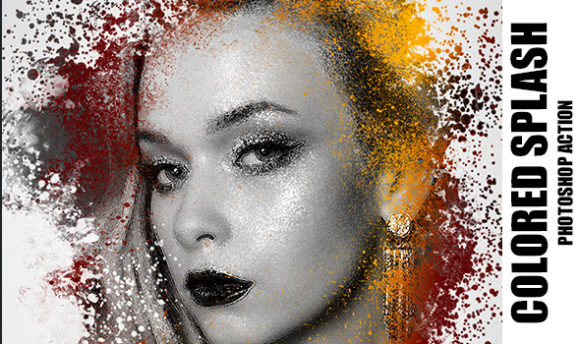
In the dynamic world of digital photography and graphic design, standing out requires more than just a good camera; it demands a unique visual signature. One of the most enduring and striking trends in modern image editing is the "colored splash" effect, often referred to as selective color or color pop. This technique isolates specific hues in an image while rendering the rest in black and white, creating a dramatic focal point that guides the viewer’s eye. While achieving this manually can be time-consuming and technically demanding, tools like the Colored Splash Photoshop Action have revolutionized the workflow for both amateurs and professionals.
This article explores the functionality, features, and practical applications of this powerful automation tool. By understanding how non-destructive actions work and what is included in a comprehensive package, you can elevate your creative output efficiently.
Understanding the Colored Splash Effect
Before diving into the technical specifications of the action file, it is essential to understand why this effect remains so popular. The human brain is wired to notice contrast. By removing color from the majority of an image, you reduce visual noise. When a single element retains its vibrant hue, it immediately becomes the subject of interest. This is not merely an aesthetic choice; it is a psychological tool used in advertising, journalism, and artistic photography to convey emotion and hierarchy.
Traditionally, creating this effect required meticulous masking. A designer would have to paint over the subject layer by layer, ensuring that no gray tones leaked into the colored areas and vice versa. This process was prone to error and difficult to adjust later. The Colored Splash Photoshop Action automates this complex process, turning hours of work into seconds of clicking.
What Is Included in the Package?
A high-quality Photoshop action is rarely just a single script. To ensure versatility and ease of use, a professional-grade package typically includes several supporting files. When you download the Colored Splash Photoshop Action, you are receiving a toolkit designed for comprehensive customization:
- 1 ATN File: This is the core action file. It contains the recorded steps that Photoshop will execute automatically. It is the engine behind the effect.
- 1 ABR File: These are custom brushes. They allow you to refine the mask manually if the automatic selection misses small details or includes unwanted background elements.
- 1 PAT File: Patterns that can be used to add texture or depth to the black-and-white portions of the image, giving it a more filmic or vintage feel.
- 1 GRD File: Gradient maps. These are crucial for adjusting the tone of the black-and-white conversion, allowing you to choose between high-contrast noir styles or softer, matte finishes.
- 1 Help File: Documentation that guides you through installation and usage, ensuring that even beginners can get started without frustration.
The Power of Non-Destructive Editing
One of the most significant advantages of using this specific action is its non-destructive nature. In digital editing, "destructive" means that changes are permanently applied to the pixel data. If you make a mistake, you often have to start over. Non-destructive editing, however, uses adjustment layers and masks. This means the original image remains untouched underneath.
With the Colored Splash Photoshop Action, the result is organized into well-arranged layers. You will find separate layers for the black-and-white conversion, the color preservation, and any additional effects. Because these layers are adjustable, you can tweak the opacity, change the blending modes, or refine the mask at any time. This flexibility is vital for professional workflows where client feedback may require subtle changes to the intensity of the effect.
Compatibility and Technical Requirements
Accessibility is key when choosing digital assets. This action is designed to work across a wide range of Adobe Photoshop versions, ensuring that you do not need the latest software subscription to utilize it. It is compatible with:
- Photoshop CS4
- Photoshop CS5
- Photoshop CS6
- Photoshop CC (Creative Cloud)
This broad compatibility makes it an excellent investment for freelancers who may work with clients using older software versions, or for students who are still learning the basics on legacy systems.
Optimizing Your Images for Best Results
While the action is powerful, the quality of the output depends heavily on the input. Automation tools thrive on clarity and resolution. For the best results, it is recommended to use images with a resolution between 1800px and 5000px.
Why does size matter? High-resolution images provide more pixel data for the action to analyze. If an image is too small or low-resolution, the edges between the colored subject and the monochrome background may appear jagged or pixelated. Conversely, extremely large files (above 5000px) may slow down the processing time without offering a visible benefit for web or standard print use. Staying within this sweet spot ensures a balance between performance and quality.
Practical Applications in Modern Creativity
The utility of the Colored Splash effect extends far beyond simple photo manipulation. Here is how it fits into various sectors of modern life and business:
Marketing and Advertising: Brands use selective color to highlight products. Imagine a black-and-white street scene with a brightly colored soda can in the foreground. The product pops instantly, drawing consumer attention without the need for cluttered text.
Social Media Content: In a feed saturated with images, a well-executed color splash stops the scroll. It adds an artistic flair that suggests effort and creativity, helping influencers and businesses build a cohesive and stylish brand identity.
Educational Materials: Teachers and presenters can use this technique to focus attention on specific parts of a diagram or historical photograph, making complex information easier to digest.
Common Misunderstandings and Tips for Success
A common assumption is that actions are "one-click wonders" that require no skill. While they automate the heavy lifting, they are not magic. The initial automatic selection might not be perfect for every image. This is where the included ABR brushes come into play. You may need to manually paint over areas where the color leaked or use the erase tool to bring color back to missed spots.
Another misconception is that this effect works best on any image. In reality, it works best when there is a clear distinction between the subject and the background. Images with busy backgrounds or subjects that blend into their surroundings may require more manual refinement. Choosing photos with good lighting and clear subjects will yield the most professional results.
Building a Broader Understanding of Workflow Efficiency
Using tools like the Colored Splash Photoshop Action is about more than just saving time; it is about creative freedom. When you remove the technical barrier of manual masking, you free up mental energy to focus on composition, storytelling, and artistic vision. It allows photographers to experiment with different looks rapidly, testing various gradients and patterns until the mood feels right.
Furthermore, understanding how these actions are structured—using layers, masks, and adjustment tools—educates users on the fundamental principles of Photoshop. By examining the well-arranged layers generated by the action, beginners can learn how professionals structure their documents, fostering better habits in their own manual editing work.
Conclusion
The Colored Splash Photoshop Action is a testament to how technology can enhance creativity rather than replace it. By providing a non-destructive, adjustable, and easy-to-use solution, it empowers users to create stunning, high-impact visuals with minimal effort. Whether you are a seasoned designer looking to speed up your workflow or a beginner eager to explore the possibilities of digital art, this tool offers a perfect blend of simplicity and control.
Remember to utilize the full package—including the brushes, patterns, and gradients—to customize the effect to your unique style. With the right images and a bit of practice, you can transform ordinary photographs into extraordinary works of art that capture attention and convey powerful messages. Embrace the efficiency of automation, but always keep your creative intent at the forefront of your work.