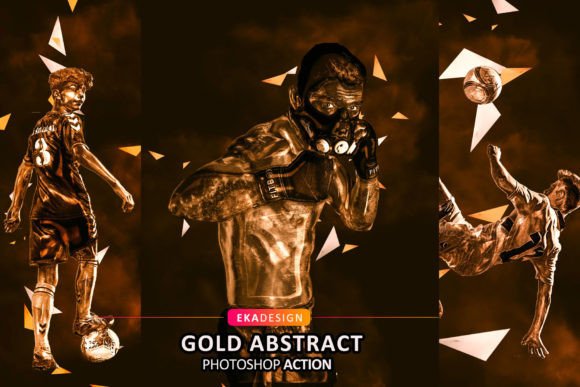
Transform Your Photos Instantly with the Gold Abstract Photoshop Action
In the fast-paced world of digital content creation, time is often the most scarce resource. Whether you are a freelance photographer trying to meet a tight deadline, a social media manager curating daily posts, or a small business owner handling your own marketing, the pressure to produce high-quality visuals is constant. This is where the Gold Abstract Photoshop Action becomes an invaluable tool in your creative arsenal. It is not just a filter; it is a sophisticated workflow automation designed to turn standard photographs into striking, metallic-infused artworks with minimal effort.
The core promise of this tool is simplicity without sacrificing quality. By reducing complex editing processes into a few clicks, it allows creators to focus more on composition and storytelling rather than getting bogged down in technical layer adjustments. However, understanding how to leverage this action effectively requires knowing its capabilities, limitations, and ideal use cases.
Why Choose Automated Abstract Effects?
Creating abstract gold effects manually in Adobe Photoshop is a labor-intensive process. It typically involves multiple steps: isolating subjects, creating complex masks, applying gradient maps, adjusting blending modes, and fine-tuning lighting effects to ensure the gold looks realistic rather than flat. For a single image, this might take an hour or more. Multiply that by ten images for a client campaign, and you have a significant bottleneck.
The Gold Abstract Photoshop Action automates these intricate steps. It analyzes the input and applies a pre-configured series of adjustments that simulate the look of liquid gold, metallic textures, and abstract light leaks. The result is a professional-grade effect that would otherwise require advanced knowledge of Photoshop’s deeper functionalities. This democratization of high-end editing techniques means that even those with intermediate skills can produce work that rivals senior designers.
Ideal Use Cases Across Industries
Understanding where this tool fits best helps maximize its value. It is not a one-size-fits-all solution for every photograph, but it excels in specific scenarios where bold, eye-catching aesthetics are required.
- Social Media Marketing: In feeds dominated by similar imagery, standing out is crucial. Fashion bloggers and lifestyle influencers can use this action to create thematic posts for holidays like New Year’s Eve or anniversaries, where gold symbolizes celebration and luxury. A simple portrait transformed with golden abstract elements can significantly increase engagement rates.
- Product Photography: Small business owners selling jewelry, perfumes, or premium cosmetics can elevate their product shots. By applying the action to images with solid color backgrounds, the gold accents draw attention to the product, adding a sense of opulence and high value without the need for expensive physical props or studio lighting setups.
- Digital Art and Portfolios: Concept artists and digital illustrators often need to create mood pieces quickly. This action can serve as a starting point or a final polish for character portraits, adding a magical or ethereal quality that enhances the narrative of the artwork.
- Event Invitations and Stationery: Graphic designers working on wedding invitations, gala tickets, or corporate awards can use processed images as background elements. The abstract nature of the gold swirls provides texture and depth without overwhelming the text placed over it.
Technical Requirements and Setup
Before diving into creative applications, it is essential to address the technical framework. The Gold Abstract Photoshop Action is compatible with a wide range of Adobe Photoshop versions, including CS4, CS5, CS6, and the Creative Cloud iterations from CC2014 through CC2021. This broad compatibility ensures that users with older hardware or software subscriptions can still benefit from the tool.
However, there is a critical constraint: the action only works with the English version of Photoshop. This is a common limitation with many third-party actions, as they rely on specific layer names and menu commands that vary across language packs. If your current interface is in Spanish, French, German, or any other language, the action will likely fail or produce errors. Fortunately, switching your Photoshop language to English is a straightforward process. Users are encouraged to check the included video tutorial, which guides them through changing the language preference in the Creative Cloud app or within Photoshop’s preferences menu. This small setup step is crucial for a smooth experience.
Optimizing Input for Best Results
While the action is powerful, it is not magic. The quality of the output is directly dependent on the quality of the input. To achieve the stunning, high-resolution results seen in previews, users must adhere to specific recommendations regarding their source images.
First, resolution matters. The recommended input size is 2500px by 3500px at 300 DPI. Using low-resolution images from smartphones or web downloads will result in pixelated or blurry gold textures, undermining the professional look. Second, the subject matter plays a significant role. The action performs best with portrait-oriented images featuring solid color objects or subjects with clear, defined edges. Complex, cluttered backgrounds can confuse the automated masking process, leading to gold effects bleeding into unwanted areas. A clean, isolated subject against a neutral or contrasting background allows the algorithm to apply the metallic effects precisely where they are needed.
The Advantage of Organized Layers
One of the most underrated features of this action is its layer organization. Many automated tools flatten images or create messy, unlabeled layers that are difficult to edit later. In contrast, the Gold Abstract Photoshop Action builds a structured layer stack. Each element—such as the base gold texture, lighting effects, color overlays, and sharpening—is placed on its own layer with logical naming.
This structure empowers users to customize the result further. If the gold tone is too yellow, you can adjust the hue/saturation layer. If the effect is too intense, you can lower the opacity of the top texture layers. This flexibility transforms the action from a rigid preset into a customizable template, allowing for unique variations that suit specific brand guidelines or artistic visions. It saves time on the initial heavy lifting while leaving room for personal touch.
What Is Included and What Is Not
When downloading the package, users receive three key components:
- Action File (.ATN): The core script that runs the editing process.
- Brushes (.ABR): Custom brushes that may be used for manual touch-ups or additional detailing.
- Help File (Notepad): Basic instructions and troubleshooting tips.
It is important to note that preview images and mockups are not included. The files you see in promotional materials are examples of what can be achieved, not templates you can simply drop your photo into. Understanding this distinction manages expectations and encourages users to experiment with their own photography.
Final Considerations for Buyers
Investing in a tool like the Gold Abstract Photoshop Action is about efficiency and aesthetic enhancement. It is ideal for those who regularly produce visual content and want to maintain a consistent, high-end look without spending hours on repetitive tasks. Before purchasing, ensure your Photoshop version is set to English and that you have access to high-resolution source material. By aligning the tool’s strengths with your specific creative needs—whether for commercial marketing, personal art, or social media presence—you can unlock a new level of productivity and visual impact.