Enhancing Digital Designs with Gold Foil Photoshop Styles
In the competitive landscape of digital design, texture and finish play pivotal roles in establishing visual hierarchy and perceived value. Among the various textural effects available to designers, metallic finishes—particularly gold—remain a staple for conveying luxury, prestige, and quality. Gold Foil Photoshop Styles offer a streamlined approach to integrating these high-end aesthetics into everyday workflows. Rather than relying on complex layer blending modes or manual brushwork, this resource provides a collection of one-click solutions compatible with Adobe Photoshop and Adobe Illustrator. For professionals and serious hobbyists alike, understanding how these tools function and where they fit within a broader design strategy is essential for maximizing efficiency without compromising artistic integrity.
Understanding the Core Components
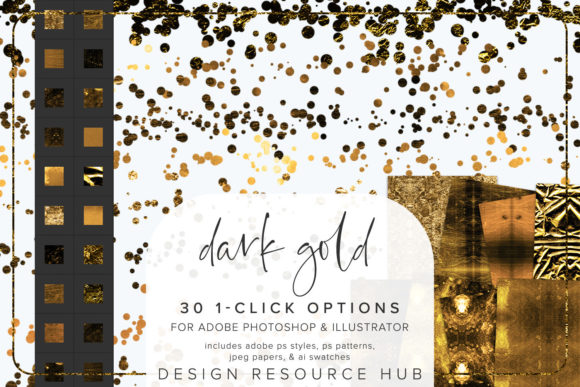
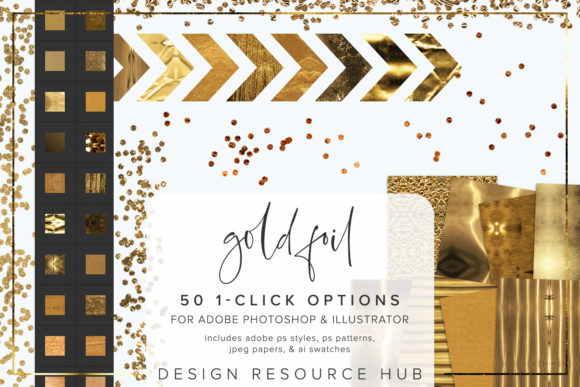
The utility of any digital asset pack lies in its composition and compatibility. This specific set is designed to bridge the gap between vector precision and raster texture. It includes several key file types that cater to different stages of the design process. The primary components are an Adobe Photoshop .pat file for patterns, an .asl file for layer styles, and an Adobe Illustrator .ai swatch file. Additionally, the package contains JPEG paper files sized at 10 x 10 inches, which serve as high-resolution base textures.
The inclusion of both Photoshop and Illustrator files is significant. Many designers work across both platforms, creating logos in Illustrator and marketing materials in Photoshop. Having synchronized swatches and styles ensures that the gold effect remains consistent regardless of the application. The .asl files allow for instant application of complex layer effects, while the .pat files enable seamless tiling for backgrounds or large surface areas. This dual-platform support reduces the friction often associated with transferring textured looks between vector and raster environments.
Installation and Workflow Integration
One of the most compelling aspects of Gold Foil Photoshop Styles is the emphasis on ease of installation and use. The single-click nature of the styles means they are completely seamless and can be applied at any size. This scalability is crucial for designers who need to adapt assets for various outputs, from social media graphics to large-format print materials.
To integrate these tools into your workflow, the process is straightforward but requires attention to detail. For Photoshop users, installing the .asl file involves navigating to the Styles panel, selecting "Import Styles," and loading the provided file. Similarly, the .pat file is loaded via the Patterns panel using the "Import Patterns" option. Once loaded, these resources become permanently available in your library, ready for immediate use on shapes, text, borders, and other design elements.
For Illustrator users, the .ai file is accessed through the Swatches panel by opening the Swatch Library and selecting "Other Library." This method keeps the main swatch panel uncluttered while providing easy access to the gold textures when needed. The ability to change the scale of the patterning allows for different applications, ensuring that the foil effect looks natural whether applied to a small icon or a full-page background.
Practical Applications and Versatility
The versatility of these styles extends beyond simple text embellishment. While applying a gold style to fonts is a popular use case, the real value emerges when these textures are combined with other design elements. For instance, marketers can use the gold accents to highlight key calls-to-action in email newsletters or landing pages. The subtle shimmer of the foil can draw the eye without overwhelming the message, provided it is used sparingly.
Freelancers and small business owners may find these styles particularly useful for branding packages. A consistent gold accent can elevate a basic logo or business card design, giving it a premium feel that justifies higher pricing tiers. Educators and publishers might use the textures to create engaging headers for presentations or book covers, where visual appeal is critical for audience engagement.
Moreover, the styles can be combined with brushes for more customized effects. By applying a base gold style and then using a textured brush to mask or reveal parts of the layer, designers can create a worn, vintage look or a sharp, modern geometric pattern. This flexibility allows for creative experimentation while maintaining the underlying consistency of the gold texture.
Evaluating Quality and Consistency
When assessing the long-term value of Gold Foil Photoshop Styles, quality and consistency are paramount. The JPEG paper files included in the set are sized at 10 x 10 inches, which provides sufficient resolution for most digital and standard print projects. However, for large-format printing, designers should verify the DPI settings to ensure the texture does not appear pixelated.
The seamless nature of the patterns is a notable strength. Poorly tiled textures can result in visible seams that distract from the overall design. These styles are engineered to avoid such issues, allowing for infinite tiling without noticeable breaks. This reliability is essential for background designs where uniformity is key.
Another consideration is the color accuracy. Gold is a complex color to reproduce digitally because it relies on light reflection and metallic sheen, which screens cannot fully replicate. These styles use gradients and noise to simulate the appearance of foil. While effective on screen, designers should always proof test prints to ensure the metallic effect translates well to physical media, possibly requiring special foil stamping techniques for true metallic results.
Who Benefits Most from This Resource?
This toolset is ideally suited for professionals who need to produce high-quality visuals under tight deadlines. Marketers, bloggers, and content creators who lack extensive photo manipulation skills can achieve sophisticated looks with minimal effort. The one-click application removes the technical barrier, allowing them to focus on messaging and layout rather than texture creation.
Experienced designers also benefit, not necessarily for the ease of use, but for the time savings. Creating realistic gold textures from scratch involves multiple layers of noise, gradient maps, and blending modes. Having a pre-built library of reliable styles allows seasoned professionals to speed up their workflow, reserving their creative energy for more complex conceptual tasks.
However, it is important to recognize the limitations. These styles are best used as accents rather than dominant elements. Overuse can lead to a cluttered, tacky aesthetic that undermines the intended message of luxury. The key is subtlety and strategic placement. Designers should consider the surrounding colors and typography to ensure the gold complements rather than competes with other design elements.
Final Thoughts on Utility and Value
In conclusion, Gold Foil Photoshop Styles represent a practical addition to any designer’s toolkit. They offer a balance between convenience and quality, providing realistic metallic effects that enhance visual appeal without requiring advanced technical skills. The inclusion of both Photoshop and Illustrator files ensures broad compatibility, while the seamless patterns and scalable styles offer flexibility for various project types.
For those looking to elevate their designs with a touch of elegance, this resource provides a reliable and efficient solution. By understanding how to install, apply, and combine these styles with other elements, users can unlock their full potential. Whether for branding, marketing, or personal projects, the ability to quickly apply professional-grade gold textures can significantly impact the perceived value of the final output. As with any design tool, success lies in thoughtful application and an eye for balance, ensuring that the gold serves the design rather than dominating it.