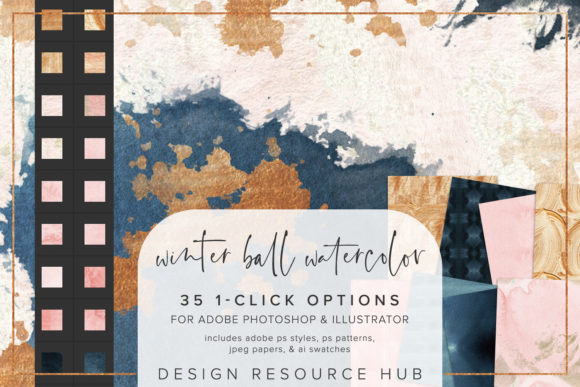
Winter Ball Watercolor PS Styles Guide
Creative workflows often stall not because of a lack of ideas, but due to the tedious technical execution required to bring those ideas to life. When designing for seasonal campaigns, holiday branding, or elegant event invitations, achieving a hand-painted watercolor aesthetic can be time-consuming. This is where Winter Ball Watercolor PS Styles becomes an invaluable asset for designers who need to balance artistic quality with production efficiency. By integrating these one-click options into your Adobe Photoshop and Illustrator workflow, you can instantly transform flat digital elements into textured, organic visuals that resonate with viewers.
The core value of this toolset lies in its ability to bridge the gap between digital precision and traditional artistry. Instead of spending hours manually layering brushes, adjusting opacity masks, and tweaking blend modes to simulate watercolor bleeding, you can apply complex textures with a single click. This capability is particularly relevant for professionals managing tight deadlines, such as marketing agencies preparing winter holiday assets or small business owners creating unique packaging designs. The result is a polished, professional look that maintains the warmth and imperfection characteristic of genuine watercolor painting.
Streamlining Design Workflows with One-Click Textures
For freelancers and in-house designers, time is a non-renewable resource. Winter Ball Watercolor PS Styles addresses this constraint by offering a seamless integration into existing Adobe ecosystems. The package includes an Adobe Photoshop .asl file for styles and a .pat file for patterns, along with an Adobe Illustrator .ai swatch file. This cross-application compatibility ensures that whether you are working on a raster-based social media graphic in Photoshop or a vector-based logo in Illustrator, you have consistent access to high-quality textures.
Consider the practical application of updating a client’s holiday newsletter. Typically, adding a subtle watercolor background or texturing a headline requires multiple steps. With these styles, you can select a text layer or shape and apply the desired effect instantly. The single-click nature of the styles means you can experiment rapidly. If one texture feels too heavy, you can switch to another in seconds, allowing for a more iterative and creative design process without the penalty of lost time. This flexibility supports a more dynamic workflow where creativity is driven by exploration rather than technical limitation.
Versatility Across Design Elements
One of the most significant advantages of this style set is its versatility. It is not limited to background fills; it can be applied to fonts, shapes, borders, and image accents. This adaptability makes it suitable for a wide range of projects, from wedding invitations and greeting cards to corporate brochures and web banners. The included JPEG paper files, sized at 10 x 10 inches, provide additional tactile depth when used as overlays or base layers, enhancing the realism of the final composition.
For educators and publishers, these tools can help create engaging visual materials that stand out in crowded digital spaces. A textbook cover or an online course thumbnail benefits greatly from the organic feel of watercolor, which can make educational content appear more approachable and less sterile. Similarly, bloggers and content creators can use these styles to add unique accents to their featured images, helping their posts gain traction in social feeds where visual distinctiveness is key. The ability to change the scale of the patterning further extends this utility, allowing users to tailor the texture density to specific design requirements, whether they need a subtle grain or a bold, expressive wash.
Installation and Technical Integration
Understanding how to integrate new assets into your software is crucial for maximizing their utility. The installation process for Winter Ball Watercolor PS Styles is designed to be straightforward, minimizing setup friction. For Photoshop users, installing the .asl file involves navigating to the Styles panel, selecting "Import Styles," and loading the file. Similarly, the .pat file is loaded via the Patterns panel using the "Import Patterns" option. This simplicity ensures that even users with intermediate technical skills can begin using the assets immediately.
Illustrator users benefit from a similarly streamlined process. The .ai file is accessed through the Swatches panel by opening the Swatch Library and selecting "Other Library." Once loaded, these swatches can be applied to vector shapes, maintaining scalability without loss of quality. This distinction is important for designers who need to resize elements for different mediums, such as printing large-format posters versus creating small digital icons. The seamless nature of the patterns means they can be tiled infinitely without visible breaks, providing a clean and professional finish regardless of the canvas size.
Enhancing Creative Expression and Brand Identity
Beyond efficiency, these styles contribute to stronger brand identity and communication. In a market saturated with generic digital graphics, the human touch implied by watercolor textures can evoke emotions of warmth, nostalgia, and authenticity. For small business owners and entrepreneurs, this emotional connection can be a differentiator. Applying these styles to product labels or promotional materials can convey a sense of craftsmanship and care, aligning the visual identity with values of quality and attention to detail.
However, it is important to consider fit and context. While watercolor styles are versatile, they may not suit every brand aesthetic. Corporate finance firms or tech startups aiming for a ultra-modern, minimalist look might find these textures too ornate. Therefore, users should evaluate their brand guidelines and target audience preferences before widespread adoption. Combining these styles with custom brushes can also yield unique results, allowing for a hybrid approach that balances consistency with individuality. This combination empowers designers to create signature looks that are both efficient to produce and distinct in appearance.
Practical Recommendations for Optimal Use
To get the most out of Winter Ball Watercolor PS Styles, consider experimenting with layer blending modes. Overlay, Multiply, and Screen modes can dramatically alter how the texture interacts with underlying colors, offering a broader range of visual effects. Additionally, using the JPEG paper files as a base layer can add a subtle grain that unifies the entire composition, making disparate elements feel cohesive.
For those new to digital texturing, start by applying the styles to simple shapes or large text blocks to understand how the patterns scale and behave. As confidence grows, integrate them into more complex compositions, such as layered illustrations or photo collages. Remember that subtlety often yields the most professional results; a light touch can enhance a design without overwhelming it. By treating these styles as a foundational tool rather than a final solution, you can maintain creative control while leveraging the technical advantages they provide.
In conclusion, Winter Ball Watercolor PS Styles offers a practical solution for designers seeking to enhance their work with organic, hand-crafted aesthetics. By reducing the technical barrier to creating watercolor effects, it allows creators to focus on composition, messaging, and overall impact. Whether you are a seasoned professional looking to speed up your workflow or a hobbyist eager to elevate your digital art, this toolset provides the flexibility and quality needed to achieve compelling visual results.